


Free tool · Updated November 2026
Card centering calculator
Upload a straight-down photo of your card, line up the outer edges and inner border, and read the exact left/right and top/bottom centering ratios against PSA, BGS, CGC and TAG thresholds. Everything runs locally in your browser; your photos are never uploaded.
Front left / right
54 / 46
Left border slightly wider
Front top / bottom
51 / 49
Nearly centered vertically
Grading company thresholds
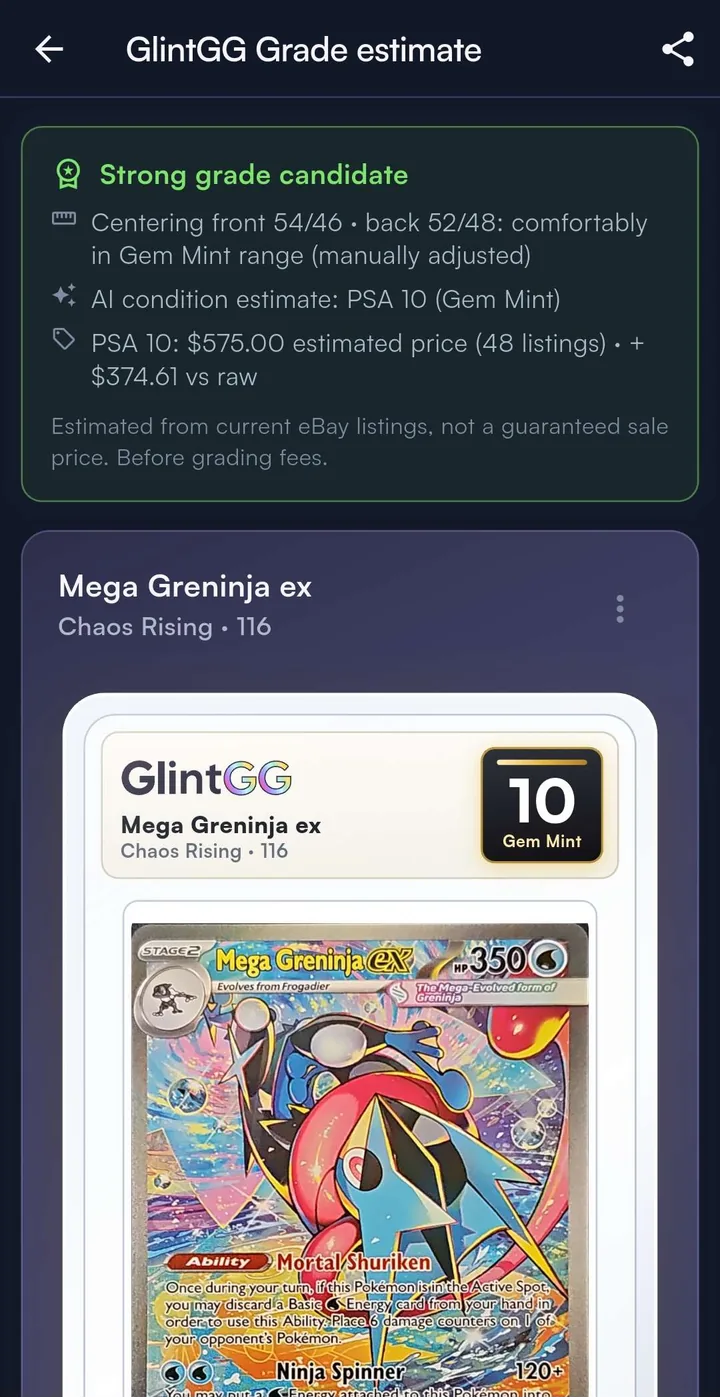
Evaluating Front (54/46 · 51/49) and Back (52/48 · 51/49)
| Grade | Front max | Back max | Centering check |
|---|---|---|---|
| PSA 10 Gem Mint | 55 / 45 | 75 / 25 | In range |
| PSA 9 Mint | 60 / 40 | 90 / 10 | In range |
| BGS 10 Black Label | 50 / 50 | 50 / 50 | Outside |
| BGS 9.5 Gem Mint | 55 / 45 | 60 / 40 | In range |
| CGC 10 Gem Mint | 55 / 45 | 75 / 25 | In range |
| TAG 10 Gem Mint | 55 / 45 | 70 / 30 | In range |
Beyond centering
Need corners, edges, surface and graded value too?
Centering is only one part of a grade. White specks on a back corner, print lines or edge wear can drop a well-centered card from a 10 to an 8.
GlintGG Grade (included in GlintGG Pro) pairs guided front and back photo capture with measured centering, condition assessment across corners, edges and surface, and the raw-versus-PSA-10 price gap so you can decide whether a card is worth submitting.
GlintGG Grade estimates combine measured centering with AI condition assessment. They are not official grades.


Questions
How is trading card centering calculated?
Measure the left and right border widths between the outer card edge and the inner artwork border, then divide each border by their sum. Repeat for the top and bottom borders. A 50/50 ratio is perfectly centered; 55/45 means one border accounts for 55% of the combined border width and the opposite border accounts for 45%.
What centering does PSA 10 require?
PSA's published Gem Mint 10 standard allows up to 55/45 centering on the front and up to 75/25 on the back. PSA 9 Mint allows up to 60/40 on the front and 90/10 on the back. Graders also evaluate corners, edges and surface, so good centering alone does not guarantee a 10.
Are my card photos uploaded to a server?
No. This centering calculator runs locally in your browser using HTML5 canvas. Your card photos never leave your device.
How should I take a photo for accurate centering?
Remove the card from glossy sleeves if glare hides the border, place it flat on a contrasting surface under even light, and shoot straight down from directly above so the card edges are parallel to the frame.
What about corners, edges, surface and graded value?
Centering is one of four grading criteria. GlintGG Grade in the GlintGG mobile app combines measured front and back centering with AI condition assessment for corners, edges and surface, plus raw-versus-graded price comparisons for PSA, BGS, CGC, TAG and AGS.